
Download WeePlug – smartwatch app, fitness tracker, pedometer, sleep monitor, multi-sport tracking, real-time notifications, Android app, wearable fitness tool, health monitoring, activity tracker
Overview
WeePlug is a mobile application designed for Android devices, developed by PACT GROUP, that functions as a smartwatch companion for fitness and wellness tracking. Positioned as a wearable fitness tool, the app aims to deliver real-time performance insights directly from the wrist, blending functionality with style. It serves individuals seeking to monitor daily physical activity, improve sleep quality, and stay connected to their smartphone notifications without constant device checks.
The software is tailored for fitness enthusiasts, health-conscious users, and individuals integrating digital wellness into their daily routines. WeePlug supports a range of activities including running, cycling, walking, hiking, and trail running, making it suitable for users engaged in diverse physical routines. Its ability to track steps, distance, calories burned, and sleep patterns suggests a focus on holistic health monitoring.
Additionally, the app enables users to receive SMS, call alerts, and social media notifications, reinforcing its role as a connected lifestyle companion. While the developer did not provide further details about the app’s background or development philosophy, the app’s feature set indicates a strong emphasis on accessibility, real-time feedback, and seamless integration with Android smartphones.
Key Features & Capabilities
- Real-Time Fitness Tracking: Monitors key metrics such as steps taken, distance traveled, and calories burned during daily activities and workouts.
- Sleep Monitoring: Tracks sleep duration and quality, offering insights into rest patterns to support better recovery and routine optimization.
- Multi-Sport Mode: Supports a variety of physical activities including running, cycling, walking, hiking, and trail running, enabling tailored tracking for different exercise types.
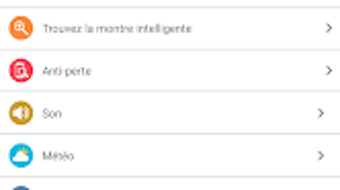
- Smart Notifications: Delivers incoming SMS, calls, and social media alerts directly to the wrist, minimizing the need to check the phone.
- Integrated Timer and Alarm: Provides customizable alarm and timer functions for daily routines, training sessions, or recovery periods.
- Pedometer Functionality: Maintains a continuous count of daily steps, helping users meet activity goals and maintain consistent movement habits.
These features collectively support users in maintaining an active lifestyle while staying informed and organized. For example, a runner can use the multi-sport tracking to log a training session, while a busy professional can rely on real-time notifications to stay updated without interrupting focus. The built-in pedometer encourages daily movement, and the sleep monitor helps users assess the impact of their activity on rest. The integration of alarms and timers adds utility beyond fitness, making WeePlug a versatile tool for time management and habit formation. The app’s design emphasizes practicality and continuous monitoring, aligning with modern digital wellness trends.
User Interface, Workflow & Performance
The user interface of WeePlug appears to be optimized for small-screen wearable devices, focusing on clarity and quick access to essential functions. Navigation is likely streamlined to support touch-based interactions, with intuitive menus for switching between activity modes, viewing metrics, and managing notifications. The workflow is designed to minimize user input during use, allowing for seamless tracking during physical activity.
Users can expect a responsive interface that updates metrics in real time, though specific performance benchmarks were not provided. The developer did not specify resource usage details such as CPU or RAM consumption, nor did they disclose stability metrics under prolonged use. Performance observations are based on general software behavior patterns for Android fitness applications.
Users may experience smooth operation during standard use, but actual responsiveness may vary depending on the device’s hardware and Android version. The app’s lightweight footprint of 15 MB suggests efficient design, which could contribute to low battery drain and faster loading times. However, actual performance in real-world conditions remains dependent on individual device configurations and background app activity.
Compatibility & System Requirements
WeePlug is designed for Android devices and is available as a free download. The software version is listed as 1.0, with a file size of 15 MB. The developer did not specify exact system requirements, including minimum Android version, RAM, or processor specifications.
Compatibility information was partially provided, confirming support for Android OS only. It is unclear whether the app supports all Android devices or requires specific hardware capabilities such as Bluetooth or sensor integration. The absence of detailed system requirements means users should proceed with caution when installing on older or low-end devices.
The developer did not indicate whether the app requires a paired wearable device or functions independently on smartphones. For optimal performance, users may need to ensure their device meets general standards for running modern fitness applications. The lack of clarity around compatibility limits may affect user experience on certain devices.
Pros and Cons
Pros
- Free to download and use, making it accessible to a broad audience.
- Comprehensive fitness tracking with support for multiple sports activities.
- Real-time notifications enhance connectivity without constant phone checks.
- Integrated pedometer and sleep monitor support holistic health monitoring.
- Lightweight design (15 MB) suggests efficient resource usage.
- Includes practical tools like timer and alarm for daily routines.
Cons
- Exact system requirements were not listed, limiting compatibility clarity.
- Performance details such as battery usage and stability were not disclosed.
- No information provided about data privacy, encryption, or cloud synchronization.
- Limited to Android platform; no support for iOS or other operating systems.
- Version 1.0 suggests a potentially early-stage release with possible feature gaps.
FAQ Section
Is WeePlug compatible with all Android devices?
While WeePlug is designed for Android, the developer did not specify minimum system requirements, so compatibility may vary across devices. Users should verify if their device meets general standards for running modern fitness applications.
Is the app safe to use and secure?
The developer did not provide information about data encryption, privacy policies, or data handling practices. Users are advised to review the app’s permissions and terms before installation.
Does WeePlug require a wearable device to function?
The app’s description does not clarify whether a paired wearable is necessary. It may function independently on smartphones or require a compatible smartwatch for full functionality.
How often does the app update?
Information about update frequency was not provided. Users should check the app store for updates to ensure they have the latest version.
Can I use WeePlug offline?
The app likely supports basic tracking features offline, such as step counting and sleep monitoring. However, real-time notifications and sync capabilities may require an active internet connection.
Final Thoughts + CTA
WeePlug presents a promising entry in the Android fitness app space, combining essential tracking tools with real-time connectivity. Its multi-sport support, pedometer, sleep monitor, and notification features make it a versatile companion for users aiming to improve physical activity and overall wellness. While the app’s lightweight size and free availability are strong advantages, the lack of detailed system requirements and performance data may raise concerns for some users.
The early version number (1.0) suggests potential for future enhancements. Overall, WeePlug is best suited for Android users seeking a simple, all-in-one fitness and lifestyle tool without a subscription cost. For those prioritizing accessibility, real-time alerts, and activity tracking, WeePlug offers solid value.
Download WeePlug now.







